How to Add a Watermark in Lightroom Classic

How to Add a Watermark in Lightroom Classic

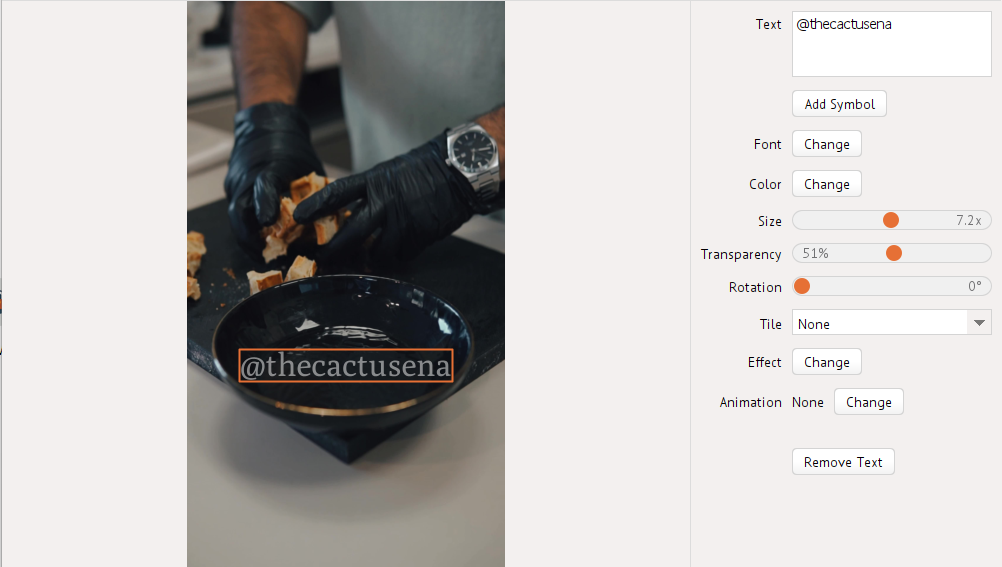
Lightroom Classic is a popular, powerful, yet rather simple software for editing photos. If you’re wondering whether you can watermark your images there, without jumping into Photoshop, you’ll be glad to know that the answer is yes. It is possible. In fact, it doesn’t take much time or effort, and you can add a watermark in Lightroom to as many photos as you want.

Let’s see how you can watermark photos in Lightroom Classic.

How to Make a Watermark in Photoshop. 3 Different Ways

How to Make a Watermark in Photoshop. 3 Different Ways

Do you want to know how to make a watermark in Photoshop quickly and effortlessly? This is the right post for you! Here you will learn all about different kinds of watermarks. Don’t worry – it’s not as intimidating as it may seem.

Before we move on to actual watermarking, however, there are some preparations that need to be done. First, open Photoshop and upload an image. It can be any image, but it would be better if it’s around the same size as the majority of your photos. Then you need to decide what kind of watermark you want.

Let’s take a look at three kinds of watermarks that you can design and apply to your pictures using Photoshop 24.3.0.

How to Watermark Photos on Android in 2026

How to Watermark Photos on Android in 2026

Nowadays, it’s almost expected of you to share photos from your trips or memorable events on your social media. And that’s where you may face some danger. For example, you upload a few images to your Facebook account.

A week later, you see those same images on another website or social media account. You’re more than sure that you’ve never uploaded your photos there and no mention of your name is anywhere in sight, which leads you to a horrifying conclusion – your photos have been stolen.

Unfortunately, content theft isn’t uncommon – it’s actually awfully widespread, especially on social networks.

Process your PDFs with our new web service

Greetings, everyone!

We are very happy to announce that we are launching a new website for processing PDF files!

Our new web service will offer several online tools. With their help, you’ll be able to merge, split, compress and convert your PDF documents. At the moment, there is only one web-based app available – Merge PDFs. But we are planning on adding the other online tools soon.